AI Tools For Student :- Studying in 2026 is NO longer limited to textbooks, handwritten Notes, and searching through hundreds of web pages. With the riSe of artificial intelligence, students can now use AI tools to understand difficult topics, create STUDY notes, practice questions, improve writing, organize assignments, learn coding, and prepare presentations.
The best part is that many AI tools for students offer free plans or FREE features that CAN be useful for everyday learning. Instead of using one tool for everything, students can combine different AI platforms according to their study nE3ds.
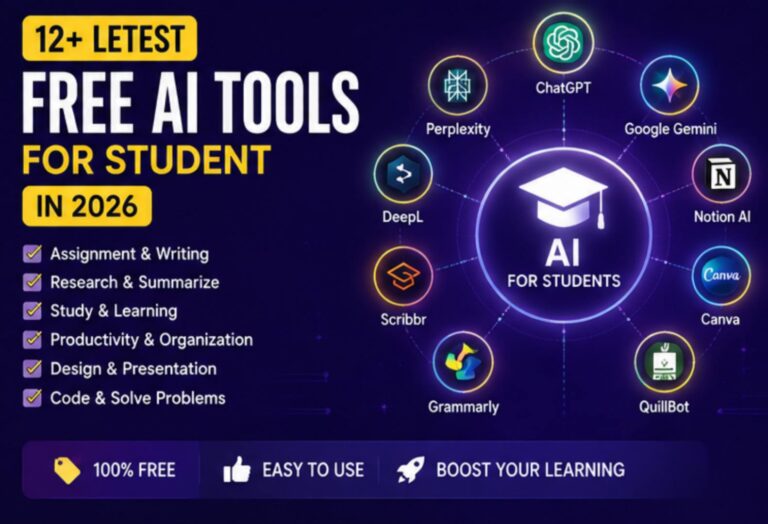
In this guiDE, we have collected some of the best AI tools for students in 2026 for free learning. Whether you are preparing for exams, working on college assignments, learning programming, reading research paPers, or creating presentations, these tools can make your study routine more orGaNized and productive.
Important: Free features, usAge limits, and available AI models can change over time. Always check the curRent plan beFore relying on a particular feature.
1️⃣ ChatGPT – A Flexible AI Learning Assistant
ChatGPT CAN be useful for students who want one AI tool for different learning tasks. Instead oF simply searching for an answer, you can ask it to explain a topic at your level, creAte practice questions, simplify difficult concepts, or HELP you organize your study plan.
For example, if you are learning a difficult science topic, you can ask for a beginner-friendly explanation first and then request examples or practice questions.
Why Students Can Use It
ChatGPT can support different stages of learning, from understanding a concept to revising it before an exam.
🔹Explains difficult topics in simpler language.
🔹Creates practice questions and quizzes.
🔹Helps orgAnize study material.
🔹Can assist with brainstorming and outlines.
🔹Supports coDing and programming explanations.
🔹Can help anAlyze documents and other study material when those features are available.
Pros :-
👉 Useful for many diffeRent subjects.
👉 Easy conversational learning experience.
👉 Helpful for brainstorming and revision.
Cons :-
🔵AI-generated inforMation should Be checked against reliAble sources.
🟢SoMe Advanced capabilities may have usAGe limits on free access.
Best For :-
General learning, explanations, revision, brainstorming, and study assistance.
2️⃣ Google Gemini – AI for Research and Study
Google GeMini is another useful option for students wHo already work with Google’s ecosystem. It can heLp with explanations, brAinstoRming, reSeaRch-oriented tasks, writing, and other acaDemic Activities.
StuDents can u$e it to tuRn a broad topic into smaller study questions or ask for different explanations of the same coNcePt.
Why It Stands Out –
OnE of its bigGest advanTages is its connection with Google’s broader productivity ecosystem, depending on the account and features available.
Useful Features
✔️ Topic explanations.
✔️ Research assistance.
✔️ Writing and Brainstorming support.
✔️ Help with study questions.
✔️ Assistance with documents and presentations whEre supported.
✔️ MultiModal understanding for supported inputs.
Pros –
🖤Convenient for students using Google services.
❤️Good for research and brainstorming.
🧡Useful for both text and visual information.
Cons –
💟Features and limits can differ between accounts and regions.
💟AI responses should still be verified before academic submission.
Best For –
Research, writing, brainstorming, and students already using Google WorksPace.
3️⃣ AI Notebook
AI NOTE BOOK is particularly interesting for students who already have their own study maTerial.
Instead of asking an AI general Questions, you can provide supPorted sources such as notes, documents, or other study resources and u$e the information as the basis 4 your leaRning session.
Imagine having a diGital notebook wHeRe you can ask:
⚝💠⚝ What are the main points of this chapter?
⚝💠⚝ Explain this toPic in siMple woRds.
⚝💠⚝ What questions could be asked from these notes?
⚝💠⚝ SuMmArize the important concepts.
⚝💠⚝ CoMpaRe twO ideas from my study material.
This makes it useful for revision.
Why StuDents LiKe It –
The biggest benefit is souRce-focused learning. StuDents cAn work with their own material rAthEr thAn staRting from a coMpLetely blank conversation.
Useful Features –
🔵 Source-based question answering.
🟤Summaries of study material.
🔵Research organizAtion.
🟤Learning-orieNted conversations.
🔵Support for multiple sources in supported workflows.
Pros –
★→ Excellent for revision.
★→ Useful for large study resources.
★→ Helps turn notes into interactive learning material.
Cons –
☆🔹☆ Results depend on the QuaLity of the uploAded souRces.
☆🔹☆ Available features can change as the platForm develops.
Best For –
Notes, textBooKs, reseArch material, AND revision.
4️⃣ Grammarly – Improve Your Academic Writing
Writing a good assigNment is NOT only About haVing ideas. Grammar, clarity, sentence structure, punctuation, and readability also matter.
Grammarly can help students identify writing issues aNd impRove the overall clArity of their text.
It can be useful when prEpAring esSays, applications, reports, emails, or other academic writing.
Why It Helps Students –
InsTead of maNually checKing evEry senTence, students can use writing AssisTaNce to identify coMmon mistAkes and make their work easier to reAd.
Useful Features –
◉ Grammar chEcKing.
◉ Spelling aNd puNctuation sugGestions.
◉ Clarity improvements.
◉ Writing style suggestions.
◉ AI-assisted writing feaTures dePenDing on the plAn.
Pros –
⚫️▶︎ Easy to uSe.
⚫️▶︎ Helpful for impRoving everyDay writing.
⚫️▶︎ Useful for stuDents writing in English.
Cons –
❤️⚝❤️ Some aDvanced features require a paid plan.
❤️⚝❤️ SuggEstions should be reviewed instead of accePting every chAnge autoMatically.
Best For –
Essays, assignments, applications, and English writing improvement.
5️⃣ QuillBot – Helpful for Paraphrasing and Summarizing
QuillBot is poPular amOng students WhO want HELP improving oR restructuring their writing.
It can bE useful when you have already understood your source material and want to expRess your OWN ideas MoRe clearly. StuDents should avoid using paraphrasing tools TO disGuise copied work; proper citations and original understanding are still iMpOrtant.
What Students Can Do –
🟢 RepHraSe sentences.
🔵 Simplify complicAted worDing.
🟤 Summarize loNger text.
🟣 IMpRove senTence flow.
⚫️ Work with citations through supported feAtures.
Pros –
<-> Several writing-focUsed tools in oNe place.
<-> Helpful for imProVing readability.
<-> Simple interFace.
Cons –
🔹➖ Free usAge has limitAtions.
🔹➖ AI-generated reWrites still need proofreading.
Best For –
Paraphrasing, sumMariZing, and imProving written drafts.
6️⃣ ChatPDF – Ask Questions About PDF Study Material
Students ofTen have 2 reAd lenGthy PDFs, research papers, manuals, and digital teXtbooks. ChatPDF-style tools can make this process more interactive.
InsTead of reading every page immediately, students can ask targeted questions about the uploaded document.
For example:
“What is the mAin idea of this chaPter?”
or
“List the important concepts discussed in this document.”
This can help students understand the structure of a laRge doCument be4 doing a detailed reading.
Why It Is Useful –
It can SaVe time whEn navigating long documents and finding specific information.
Pros –
👉 Convenient fOr PDF-based learning.
👉 Useful for finding information quickly.
👉 Can help crEatE summaries from documents.
Cons –
🔴⚫️ Accuracy dePenDs on the document and AI processing.
🔴⚫️ Scanned or poorly formatted PDFs may be more difficult to process.
🔴⚫️ Free usage MAY hAvE fiLe or usage restrictions.
Best For –
PDF textBooks, resEaRch papers, notes, and document revision.
7️⃣ Notion AI – Organize Notes, Tasks, and Projects
StuDying beCoMes much eaSier wHen your notes, AssigNments, deadlines, and projects are organized.
Notion comBines noTe-taKing aNd workspace features, while its AI caPabiliTies CaN assist with writing, suMmarizAtion, brainstorming, and organizing information.
Students can creAte sepArate spaCes for subjects, prOjects, assignments, and ReCision material.
How StUdents CaN UsE It –
▶️ Create a study workspace containing:
▶️ Subject notEs
▶️ Assignment deadlines
▶️ ProJect information
▶️ Revision lists
▶️ ImpoRtant rEsourCes
▶️ StUdy gOals
▶️ AI can thEn assist wiTh supPorted writing aNd organization taSks.
Pros –
☑️ Combines notes and organization.
☑️ Useful for long-term projects.
☑️ Flexible workspace.
Cons –
🔲 Can take time to learn.
🔲 Some AI functionality may require a paid plan.
Best For –
Study organization, notes, projects, and task management.
Best Free AI Tools for Students
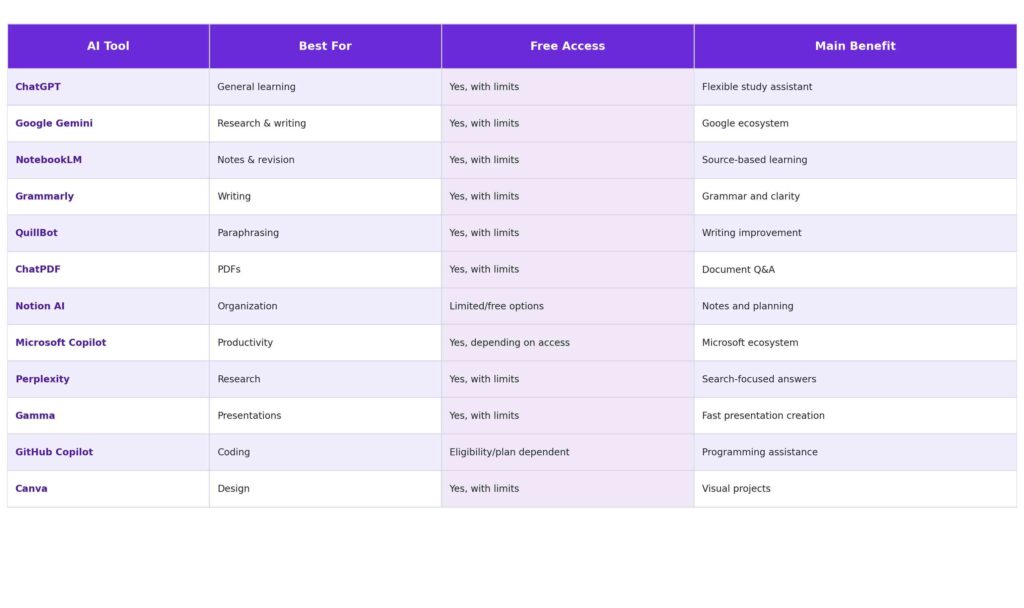
Which AI Tool Is Best for Different Student Needs?
There is no single AI tool that is perfect for every student. The right option depends on what you are trying to accomplish.
For Understanding Difficult Topics –
ChatGPT, Google Gemini, and NotebookLM are strong choices for explanations and concept-based learning.
For Writing Assignments –
Grammarly and QuillBot can help improve graMmar, clarity, and wording.
For Reading PDFs –
NotebookLM and ChAtPDF can MaKe large documents easier to navigate and understand.
For Research –
Perplexity, Gemini, and NotEboOk can support research and information organization.
For Coding –
ChatGPT and GitHub Copilot CAN assist with programming explanations and development.
For Notes and Organization
Notion AI and NotebookLM are useful choices for organizing study resources.
For Presentations –
Gamma and Canva can help students create visually appealing academic projects.
How to Build a Free AI Study System
Using ten different AI tools AT tHE same time isn’t necessary. A better strategy is to create a simple workflow.
🔴 Collect Your Study Material
Keep your textbooks, notes, PDFs, and classRoom resources orgAnized.
🔴 Understand the Topic
Use An AI assistant to explain difficult conCepts in simple language.
🔴 Create Revision Notes
Turn imp0rtant information into shOrt sumMaRies, KEY points, or Question-anSwer forMats.
🔴 Practice Without Looking at the Answer
AsK AI to GenErAte practice questions and try solving them yourself first.
🔴 Improve Your Writing
Use writing tools to identiFy gramMar and claRity issues in your oWn draft.
🔴 Organize Your Work
Use a note-taKing or prodUctivity platForm to kEeP assignments, deadlines, and reSouRces toGether.
🔴 Prepare Presentations
Use presentation and deSign tools to create a starting structure, then custOmiZe the coNtent yourself.
Smart Ways Students Should Use AI
AI becomes much MoRe valuable wHen you u$e it FOR learning instead of simply getting answers.
Instead of aSking:
“Give me the aNsWer.”
Try:
“ExPlain how to solve this problem step by step and then giVe me a similar question to practice.”
Instead of:
“Write my assigNmEnt.”
Try:
“Help ME creAte an outLine and explAin what information each section should conTain.”
Instead of:
“Summarize everyThing.”
Try:
“Create 5 important Questions frOm this chaPter and test me one by one.”
This appRoach heLps you build your oWn undersTaNding.
Benefits of AI Tools for Students
AI study tools cAn proVide sEveRal advaNtaGes when usEd resPonSibly.
💟 Faster LeArning –
Students can quickly get explanations, examples, summaries, And praCtice matEriAl.
💟 PersOnaLizEd ExplaNatiOns –
You can ask for beginner, intermediate, or advanced exPlanations depEnding On your undersTaNding.
💟 Better OrgaNizAtion –
AI can help turn scatteRed inforMation into structured noTes and study plans.
💟 Writing ImpRovement –
Writing assistants can identify grammar and readability problems.
💟 More PraCtiCe –
AI can geNeRate additional questions when your textbook doEs not provide enough exercises.
💟 Support fOR Different LearNing StYles –
Students can work with teXt, diagRams, suMmaries, exaMples, And interactive questions depEnding on the tool.
Things Students Should Avoid When Using AI
AI is helPful, but it should nOt replAce your oWn leArning.
Avoid submitting AI-genErated assignMents as your own work wHen your school or college reQuires origiNal work.
YoU should also avoid blindly trusting AI-generated AnSwErs. AI systems can someTimEs produce inCorRect, outdated, incoMplEte, or misleading information.
Always Remember :
👉 VeriFy impoRtant faCts.
👉 Read the original sources.
👉 Follow your scHool’s AI policy.
👉 ProTect personal information.
👉 Don’t uplOad confidEntial doCuMents unnecessarily.
👉 Understand the answer instEad of simPly coPying it.
👉 Use AI to strengthen your skills rather thAn avoid learning.
Frequently Asked Questions
(1) Are AI tools free for students in 2026?
Many AI platForMs provide free access or free tiers, but the amount of usage and available features can differ. Some advanced functions require subscriptions, while others may HaVe student or educational eligibility programs.
(2) Which is the best free AI tool for students?
There is no uniVerSal winner. ChatGPT is useful for general leArning, NotebookLM is excellent for working with study souRces, Gemini is useful for research and Google-based woRkfLows, while Grammarly and QuillBot focus more on writing.
(3) Can AI tools help with exam preparation?
Yes. StudEnts can use AI to creAte reVisiOn quEstioNs, explain difficult conCePts, summarize their own noTes, create quizzes, and identify topics that need AdditiOnal praCtice.
(4) Can students use AI for assignments?
AI can be useful for brainStorming, research, outLiniNg, proofreading, and leaRning. However, students should follow their school’s or college’s rules about AI-generated content and MaKe sure submitted work reflects their own understanding.
(5) Which AI tool is best for writing?
Grammarly is uSeful for grammar, clarity, and writing improvement, while QuillBot cAn help with rewriting and summarization. A geNeral AI assistant can also help with brainstorming and outlining.
(6) Which AI tool is best for coding students?
Coding-focused tools such aAS GitHub Copilot can assist with programming, whiLe general AI assistants can explain errors and programming concepts. Students should always understand and test generated code.
(7) Can AI replace teachers?
No. AI can proVide explanAtions and prActice suPport, but teAchers offer human guidance, context, feedback, motivation, and educational judGment thAt an AI tool cannot fully replace.
(8) Is it safe to use AI for studying?
Generally, stuDents should use established services caRefully and avoid shaRing sensitive personal information. AlwAys review tHe privacy settings and terMs of the service you use.
Conclusion -
The best AI tools for students for learning for free in 2026 are not necessarily the tools with the most features. THE best tool is the oNe that solves your specific study problem.
For geNeRal leaRning, ChATGPT and GooGle Gemini can be useful. For source-based revision, NoteBook is a strong option. For writing, Grammarly and QuillBot can heLp. For PDFs, ChatPDF can make document reseArch easier. Students who need organization can expLore Notion, while coding learners can use proGramming-focused AI assistance. For presentations and visual projects, Gamma and CanVa can save signiFicant formatting time.
The smartest appRoach is to combine a few tools instead of depending compLetely ON one platForm. Use AI to understand difficult subjects, practice concepts, orGaniZe information, improve your drafts, and discover better ways to learn.
AI should be your study assistant—not your replacement for thinKing.
Use it responsibly, verify important information, follow your academic rules, and keep building your own knowledge and skills. With the right workflow, free AI tools can make learning more flexible, organized, and engaging throughout 2026.
1 thought on “Best 12+ Letest Free AI Tools For Student in 2026”